
How to Build a Professional Social Science Journal Website with Online Submission and Peer Review
A professional journal website is more than an online noticeboard displaying calls for papers and downloadable article PDFs. It is the operational centre of a scholarly publication. Authors use it to understand the journal and submit manuscripts. Editors use it to manage decisions. Reviewers use it to evaluate research. Readers use it to discover and cite published articles. Evaluation services use it to examine editorial transparency, publication regularity and metadata quality.
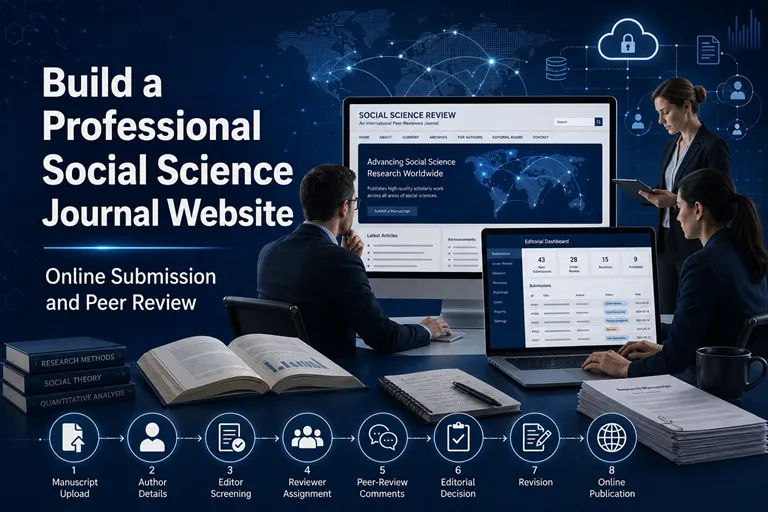
For a social science journal, the website must also support the particular needs of research involving society, culture, governance, economics, education, psychology, media, inequality and public policy. Manuscripts may include qualitative interviews, surveys, field observations, archival analysis, policy evaluation, mixed methods or sensitive human-participant data. The journal’s submission and review systems must be capable of handling these requirements consistently.
Many journals begin with a basic website and email-based submission process. This may work when only a few manuscripts are received, but it soon creates operational problems. Authors may not know the status of their papers. Editors may lose track of manuscript versions. Reviewer reports may remain scattered across personal inboxes. Editorial decisions may not be documented properly. Published articles may lack permanent landing pages and structured metadata.
A journal-management platform solves these problems by connecting the public website with manuscript submission, editorial screening, peer review, production, publication and archiving.
This guide explains how colleges, universities, research institutions, academic societies and independent publishers can build a professional social science journal website with an efficient and transparent editorial workflow.
Why a Journal Website Must Be Designed as a Publishing System
A normal institutional website is designed mainly to present information. A journal website must present information and manage scholarly processes.
It needs to serve several users with different requirements:
- Prospective authors evaluating the journal
- Registered authors submitting and revising manuscripts
- Editors screening submissions and making decisions
- Reviewers receiving and completing assignments
- Production staff preparing accepted manuscripts
- Readers discovering and downloading articles
- Librarians verifying bibliographic information
- Metadata services identifying and linking published content
- Evaluation bodies reviewing the journal’s transparency and quality
A website that looks attractive but cannot manage these functions is incomplete. Similarly, powerful editorial software with a confusing public interface may discourage authors and readers.
The best journal website integrates design, workflow, metadata and scholarly policy.
Step 1: Define the Website’s Users and Objectives
Before choosing a theme or platform, identify what each user should be able to do.
Authors should be able to:
- Understand the journal’s aims and scope
- Review author guidelines and policies
- Create an account securely
- Submit manuscript details and files
- Receive a manuscript identification number
- Track the submission’s progress
- Upload revised versions
- Respond to reviewer comments
- View editorial decisions
- Download acceptance or publication documents
Editors should be able to:
- View new submissions
- Complete administrative checks
- Assign manuscripts to section editors
- Invite and manage reviewers
- Monitor overdue reviews
- Record editorial decisions
- Request revisions
- review author responses
- Move accepted manuscripts into production
- Publish articles and organise issues
- Maintain author, reviewer and editorial records
Reviewers should be able to:
- Accept or decline invitations
- Review the manuscript’s title and abstract before accepting
- Declare conflicts of interest
- Access the anonymised manuscript securely
- Complete structured review forms
- Upload supporting files
- Submit confidential comments to the editor
- Recommend an editorial outcome
- Review revised manuscripts when required
Readers should be able to:
- Browse current and previous issues
- Search articles
- Read article abstracts
- Download full texts
- view citation details
- Find DOI and licensing information
- Access references and supplementary material
- Share stable article links
These requirements should guide both platform selection and website architecture.
Step 2: Choose an Appropriate Domain and Hosting Structure
The journal should operate through a stable and recognisable domain.
Suitable structures include:
journalname.orgjournal.university.edujournals.university.edu/journalname- A journal subdomain on an established publishing platform
The domain should be controlled by the publishing institution or responsible publisher. Login credentials, renewal details and domain ownership should not depend solely on a temporary employee or external developer.
Domain-selection principles
The domain should be:
- Short and easy to remember
- Clearly connected to the journal
- Free from unnecessary words and characters
- Suitable for long-term use
- Secured through HTTPS
- Consistent across all official records
If an existing journal changes its domain, DOI records, metadata, sitemaps and external links must be updated.
Hosting considerations
Journal hosting should provide:
- Reliable uptime
- Secure HTTPS
- Regular backups
- Malware and security monitoring
- Adequate storage
- Database protection
- Software updates
- Email-delivery support
- Recovery planning
- Technical assistance
Low-cost generic hosting may appear economical but can become risky if the journal lacks technical staff to manage security, backups and upgrades.
Step 3: Choose the Right Journal-Management Platform
The platform determines how efficiently the journal will operate. It should support the complete editorial lifecycle rather than only article display.
ScholarJMS for a managed journal workflow
ScholarJMS integrates journal website creation, manuscript submission, peer-review management, editorial processing, article publication and structured metadata.
It can be suitable for social science journals that need:
- A branded and responsive website
- Online manuscript submission
- Role-based author, editor and reviewer access
- Editorial-stage tracking
- Peer-review management
- Article and issue publication
- Search-friendly article pages
- Metadata organisation
- Crossref DOI workflow support
- Managed technical assistance
- Multi-journal management where required
A managed platform can be particularly useful for colleges and editorial teams without dedicated server administrators.
OJS for institutions preferring open-source publishing software
Open Journal Systems is a widely used open-source journal-publishing application. It supports submissions, editorial roles, peer review, production and issue publication.
Institutions selecting OJS must also plan for:
- Server configuration
- Installation
- Version upgrades
- Plugin compatibility
- Theme development
- Security monitoring
- Email configuration
- Database backups
- Performance optimisation
- Technical troubleshooting
OJSCloud provides managed OJS hosting, installation, support, customisation, upgrades and migration. This can help institutions use OJS without managing every technical responsibility internally.
Compare platforms according to actual requirements
The selection should consider:
| Requirement | Questions to ask |
|---|---|
| Technical capacity | Does the institution have a server administrator or developer? |
| Workflow | Can the platform reflect the journal’s actual editorial stages? |
| Design | Can the journal use its own branding and page structure? |
| Submission | Are all required manuscript fields and files supported? |
| Peer review | Does the system support the selected review model? |
| Metadata | Can it produce complete article-level metadata? |
| DOI workflow | Can DOI information be registered and maintained efficiently? |
| Support | Who will resolve technical and workflow problems? |
| Security | Who manages updates, backups and user access? |
| Migration | Can existing articles, users and records be transferred? |
| Cost | What are the real annual costs, including maintenance and support? |
The best platform is the one the institution can operate reliably over the long term.
Need a professional journal website with submission and peer review?
We can help with:
- ScholarJMS journal website setup
- Online manuscript submission configuration
- Editorial and peer-review workflow setup
- OJS installation, hosting, upgrades and support
- OJS-to-ScholarJMS migration
- Existing journal website migration
- ISSN consulting and website-readiness review
- Crossref DOI and metadata-workflow support
WhatsApp: +91 82003 85143
Email: inquiry@ojscloud.com
Step 4: Plan the Journal Website Architecture
The website should make essential information easy to find. Authors should not need to search several pages to discover the journal’s scope, charges or review process.
Essential public pages
A professional social science journal website should include:
- Home
- About the Journal
- Aims and Scope
- Editorial Board
- Instructions for Authors
- Manuscript Preparation Guidelines
- Peer-Review Process
- Publication Ethics
- Authorship Policy
- Plagiarism Policy
- Conflict-of-Interest Policy
- Human-Participant Research Policy
- AI-Use Policy
- Complaints and Appeals
- Corrections and Retractions
- Copyright Policy
- Open-Access and Licensing Policy
- Publication-Charges Policy
- Privacy Policy
- Archiving Policy
- Current Issue
- Archives
- Submit Manuscript
- Track Manuscript
- Contact
- Publisher Information
The website menu should group these pages logically under sections such as About, For Authors, Policies and Publications.
Homepage priorities
The homepage should communicate the journal’s identity immediately. It should display:
- Full journal title
- Recognisable logo
- Short scholarly statement
- Print and electronic ISSNs, where assigned
- Publisher name
- Editor-in-Chief
- Publication frequency
- Access model
- Current issue
- Submission link
- Call-for-papers status
- Contact information
Avoid overcrowding the homepage with moving banners, excessive badges and unsupported claims.
Step 5: Design the Website for Academic Trust
A scholarly website should appear stable, clear and institutional. Design choices influence whether authors perceive the journal as credible.
Recommended visual principles
- Use a restrained institutional colour palette
- Maintain consistent typography
- Use sufficient white space
- Apply clear heading levels
- Ensure strong colour contrast
- Keep navigation consistent
- Use high-quality journal branding
- Avoid intrusive pop-ups
- Make buttons descriptive
- Optimise layouts for mobile devices
- Display issue covers without reducing article visibility
- Keep page-loading time reasonable
A professional design does not require complicated animation. Academic readers generally value clarity, speed and access to information.
Mobile responsiveness
Authors, reviewers and readers increasingly use mobile devices. All key functions should work on smaller screens, including:
- Navigation
- Submission guidance
- Account login
- Manuscript tracking
- Review forms
- Abstract reading
- PDF downloading
- Contact links
Complex editorial tasks may still be more comfortable on a computer, but the interface should remain usable on mobile devices.
Accessibility
The website should support users with different visual, motor and cognitive needs. Important measures include:
- Logical heading structure
- Keyboard-accessible navigation
- Descriptive link labels
- Alternative text for meaningful images
- Sufficient contrast
- Clear form labels
- Visible focus indicators
- Accessible error messages
- Readable font sizes
- Text-based information instead of image-only text
Accessibility improves both inclusion and general usability.
Step 6: Create Clear Journal Identity and Publisher Information
The website must state who owns and publishes the journal.
Publisher information should include:
- Legal or institutional publishing name
- Postal address
- Official website
- Responsible contact person
- Dedicated email address
- Telephone number
- Country of publication
- Institutional relationship to the journal
The journal’s title and publisher should be presented consistently across:
- Website header
- About page
- ISSN records
- Article PDFs
- DOI metadata
- Copyright notices
- Issue covers
- Author correspondence
- External applications
Inconsistency can create problems during ISSN verification, DOI registration or indexing evaluation.
Step 7: Build a Structured Online Submission Form
The submission form should collect complete information without creating unnecessary barriers.
Core submission fields
The form should normally request:
- Article title
- Article type
- Abstract
- Keywords
- Author names
- Author order
- Institutional affiliations
- Corresponding-author details
- Email addresses
- ORCID identifiers, where available
- Country
- Cover letter
- Main manuscript
- Tables and figures
- Supplementary files
- Funding information
- Conflict-of-interest declaration
- Ethics-approval information
- Informed-consent statement
- Data-availability statement
- AI-use disclosure
- Suggested or opposed reviewers, if applicable
Support different article types
A social science journal may accept:
- Original research articles
- Review articles
- Theoretical papers
- Policy analyses
- Case studies
- Methodological papers
- Short communications
- Book reviews
- Research notes
- Field reports
The system should display relevant requirements for each article type.
Provide a submission checklist
Before completing submission, authors should confirm that:
- The manuscript matches the journal’s scope
- The work is original
- The manuscript is not under review elsewhere
- All authors approved the submission
- References are complete
- Identifying information has been removed where required
- Ethical approval and consent have been addressed
- Conflicts of interest and funding are disclosed
- Files follow the journal’s format
- AI assistance has been disclosed where applicable
A good checklist prevents avoidable administrative delays.
Step 8: Automate Acknowledgement and Manuscript Identification
After submission, the system should immediately create a unique manuscript number and send an acknowledgement.
The message should contain:
- Journal name
- Manuscript number
- Article title
- Submission date
- Corresponding-author name
- Confirmation of files received
- General explanation of the next step
- Link to track the manuscript
- Editorial contact information
Avoid promising acceptance or an exact decision date in an automated acknowledgement.
The manuscript number should remain associated with every version, review report and decision.
Step 9: Configure Initial Editorial Screening
Not every manuscript should proceed directly to external review. Editors should first conduct administrative and scholarly screening.
Administrative checks
- Required files are present
- Author details are complete
- Manuscript is anonymised where required
- Declarations are provided
- Formatting requirements are substantially met
- Tables and figures are readable
- Supplementary files open correctly
Editorial checks
- Topic falls within scope
- Research question is meaningful
- Methodology is potentially appropriate
- Manuscript has sufficient scholarly quality
- Ethical concerns are addressed
- References are relevant
- The work does not show obvious duplication
- Language permits meaningful evaluation
The system should allow editors to return incomplete submissions, reject unsuitable papers or advance qualified manuscripts to peer review.
Plagiarism and similarity review
Similarity reports should support editorial judgement rather than replace it. A percentage alone cannot establish plagiarism. Editors should inspect the nature, source and context of matching text.
Policies should distinguish among:
- Legitimate quotation
- Standard methodological language
- Inadequate paraphrasing
- Duplicate publication
- Self-reuse
- Fabricated or manipulated content
Step 10: Configure Editorial Roles and Permissions
A secure journal-management system should use role-based access. Users should see only the information necessary for their responsibilities.
Common roles
- Publisher Administrator
- Editor-in-Chief
- Managing Editor
- Section Editor
- Associate Editor
- Reviewer
- Author
- Copy Editor
- Proofreader
- Production Editor
- Website Administrator
Permission principles
- Authors should access only their submissions
- Reviewers should access only assigned manuscripts
- Reviewer identities should be protected under anonymous-review models
- Editors should see records relevant to their assigned role
- Production staff should access accepted manuscripts
- Administrative users should not make editorial decisions unless authorised
- Former team members should have access removed promptly
The platform should maintain a record of major workflow actions and decisions.
Step 11: Build a Credible Peer-Review Workflow
The website should explain the journal’s review model clearly. Authors should know how manuscripts are evaluated, while reviewers should receive structured guidance.
Common models include:
- Single-anonymous review
- Double-anonymous review
- Open peer review
- Transparent peer review
- Editorial review for specific non-research content
DOAJ’s application guidance requires journals to state the type and details of peer review clearly. The current guidance generally expects independent subject experts to participate in quality control.
Example of a double-anonymous workflow
- Manuscript receives administrative screening.
- Editor evaluates scope and basic scholarly quality.
- Identifying details are checked and removed.
- A qualified handling editor is assigned.
- Independent reviewers are invited.
- Reviewers declare conflicts of interest.
- Review reports are submitted through the system.
- Editor evaluates the reports.
- Author receives a decision and anonymised comments.
- Author uploads a revised manuscript and response document.
- Editor or reviewers assess the revision.
- The authorised editor records the final decision.
Configure editorial decisions
The system should support decisions such as:
- Reject before review
- Reject after review
- Major revision
- Minor revision
- Resubmit for fresh review
- Accept subject to technical corrections
- Accept
- Withdraw
- Close as incomplete
Decision letters should be editable. Editors should explain the decision rather than send only a status label.
Reviewer forms
A structured review form may ask reviewers to assess:
- Relevance to scope
- Originality
- Literature engagement
- Research question
- Methodology
- Ethical considerations
- Analysis
- Interpretation
- Clarity
- References
- Contribution to the field
The form should also provide space for confidential comments to the editor and constructive comments to the author.
Step 12: Protect Peer-Review Integrity
Technology cannot guarantee high-quality peer review, but it can support consistent safeguards.
The system should help editors:
- Verify reviewer identities and affiliations
- Record conflicts of interest
- Monitor repeated reviewer recommendations
- Detect unusual email domains
- Avoid author-controlled reviewer accounts
- Track review history
- Monitor overdue assignments
- Prevent unauthorised access
- Retain decision and review records
Reviewer selection
Suitable reviewers should have relevant expertise and sufficient independence. Editors should avoid relying entirely on suggested reviewers or personal networks.
Reviewers should not be selected when there is a significant conflict involving:
- Recent collaboration
- Shared institutional affiliation
- Supervisory relationships
- Financial interests
- Personal disputes
- Direct competition
Transparent peer review through Scholar9
Scholar9 can support a transparent peer-review and research-trust ecosystem where this model suits the journal.
Possible benefits include:
- Greater accountability
- Recognition of reviewer contributions
- Visible review history
- Improved trust in the evaluation process
- Broader reviewer-network support
Transparent review should be implemented with clear policies and appropriate consent. It should not expose confidential identities when the journal has promised anonymous review.
Step 13: Create Author and Reviewer Dashboards
A good dashboard reduces repetitive email and improves transparency.
Author dashboard
Authors should be able to view:
- Manuscript number
- Submission date
- Current status
- Editorial messages
- Required actions
- Reviewer comments
- Revision deadlines
- Previous manuscript versions
- Decision history
- Publication information after acceptance
Status labels should be understandable. Internal technical terms may confuse authors.
Reviewer dashboard
Reviewers should be able to view:
- Pending invitations
- Accepted assignments
- Due dates
- Manuscript files
- Review guidelines
- Review forms
- Completed assignments
- Certificates or acknowledgement, if provided
Reviewer access should end appropriately after the assignment is completed.
Step 14: Manage Revisions without Losing Version Control
Version confusion is a common weakness in email-based workflows. The platform should preserve each manuscript version while identifying the current one clearly.
A revision submission should include:
- Clean revised manuscript
- Marked or tracked-changes manuscript, where requested
- Point-by-point response to reviewers
- Updated figures or supplementary files
- Revised declarations, where necessary
Editors should be able to compare versions and determine whether reviewer concerns were addressed.
The system should not overwrite the original submission or earlier review records.
Step 15: Connect Accepted Manuscripts to Production
Acceptance does not mean that a manuscript is ready for publication. The website platform should support a production workflow covering:
- Copyediting
- Author queries
- Reference checking
- Figure preparation
- Layout and typesetting
- Proof generation
- Author approval
- Metadata verification
- DOI preparation
- Final publication
Proof approval
Authors should confirm:
- Title
- Name spelling
- Author order
- Affiliations
- Corresponding-author details
- Abstract and keywords
- Tables and figures
- Funding statements
- Conflict declarations
- References
Substantive changes after acceptance should require editorial approval.
Step 16: Build Individual Article Landing Pages
Every article must have a dedicated webpage. Uploading all PDFs to one issue page is inadequate for modern scholarly publishing.
A professional landing page should display:
- Article title
- Author names
- Affiliations
- ORCID identifiers, where available
- Abstract
- Keywords
- Article type
- Publication date
- Volume and issue
- Page range or article number
- DOI
- Citation format
- Licence
- Copyright statement
- Funding information
- Conflict-of-interest statement
- Data-availability statement
- Full-text link
- References
- Supplementary material
- Correction or retraction status, where applicable
Crossref requires each registered DOI to resolve to a unique landing page maintained by the publisher. Its landing-page guidance explains that the page should help users confirm that they have reached the correct scholarly item.
A DOI should generally resolve to the article page rather than directly triggering a PDF download.
Step 17: Implement Structured Article Metadata
Metadata determines whether articles can be discovered, cited and connected across scholarly systems.
Important fields include:
- Journal title
- ISSN
- Publisher
- Article title
- Author names
- Affiliations
- ORCID identifiers
- Abstract
- Keywords
- Article type
- Publication date
- Volume
- Issue
- Page range or article number
- DOI
- References
- Funding data
- Licence URL
- Landing-page URL
Crossref distinguishes between required, recommended and optional metadata. Complete records are more useful than minimally compliant records.
Maintain metadata after publication
Metadata may need updating when:
- An author name is corrected
- An affiliation is revised
- The article URL changes
- A correction is published
- Funding information is added
- A retraction or expression of concern is issued
- The journal migrates to another platform
Metadata management is an ongoing publisher responsibility.
Step 18: Integrate Crossref DOI Registration
Journals can register DOIs through direct Crossref membership or an appropriate sponsorship route.
A DOI workflow should include:
- Verify article metadata.
- Generate the DOI suffix according to the journal’s pattern.
- Create the permanent article landing page.
- Register the DOI and metadata.
- Confirm successful registration.
- Display the active DOI on the landing page and PDF.
- Test DOI resolution.
- Update the record if the URL or metadata changes.
GetDOI can assist publishers with Crossref DOI planning, sponsorship or setup guidance, metadata preparation, DOI registration workflow and corrections.
Need help with Crossref DOI integration and journal metadata?
GetDOI can support:
- Crossref membership or sponsorship guidance
- DOI-prefix and suffix planning
- Article metadata preparation
- DOI registration workflow
- DOI landing-page integration
- Metadata correction and maintenance
- DOI support during journal migration
WhatsApp: +91 82003 85143
Email: inquiry@ojscloud.com
Step 19: Prepare the Website for ISSN Review
A professional website can strengthen ISSN readiness by presenting the journal as a genuine continuing publication.
The website should clearly display:
- Final journal title
- Publisher identity
- Place of publication
- Aims and scope
- Editorial board
- Publication frequency
- Contact details
- Author guidelines
- Peer-review information
- Published content as required by the applicable ISSN centre
- Issue details
- Consistent journal identity across pages and PDFs
OJSCloud can provide ISSN consulting and website-readiness review. This may include identifying missing pages, checking consistency and guiding the publisher through the applicable application process.
The responsible ISSN authority makes the final assignment decision. Platform providers and consultants cannot guarantee approval.
Step 20: Build Future Indexing Readiness
A website cannot guarantee indexing, but poor website structure can prevent an otherwise credible journal from being evaluated successfully.
For future readiness, maintain:
- Accurate journal identity
- Regular publication
- Transparent peer review
- Ethical policies
- Editorial-board affiliations
- Clear publisher information
- Individual article pages
- Complete metadata
- Stable URLs
- Accessible full texts
- ISSN display
- Licensing information
- Author-charge transparency
- External authorship and review
- Publication history
DOAJ’s current criteria require a dedicated journal URL, individual full-text article pages, clear open-access information, editorial-board details, peer-review information and transparent copyright, licensing and fee policies.
New journals should build these elements from the start instead of redesigning the website immediately before an application.
Avoid false claims
Do not display:
- Unverified impact factors
- Logos of services that have not accepted the journal
- “Scopus indexed” before official confirmation
- “Web of Science indexed” based on presence in an unrelated service
- Guaranteed indexing promises
- Fabricated metrics
- Misleading Crossref or ISSN claims
Credibility depends on verifiable information.
Step 21: Implement Search, SEO and Discoverability
The journal website should make articles understandable to both readers and search systems.
Journal-level SEO
- Descriptive homepage title
- Accurate meta description
- Clear headings
- XML sitemap
- Search-friendly URLs
- Canonical links
- Mobile responsiveness
- Fast page loading
- Secure HTTPS
- Internal links among policies, issues and articles
Article-level SEO
Each article page should include:
- Full article title
- Author metadata
- Abstract
- Keywords
- Citation metadata
- DOI
- Publication date
- Journal title
- Volume and issue
- Full-text link
- Structured scholarly metadata
Avoid publishing articles only as scanned PDFs. Search systems and readers need accessible text and metadata.
Internal linking
Connect:
- Homepage to current issue
- Issues to individual articles
- Author guidelines to submission
- Peer-review policy to reviewer guidance
- Articles to related content
- Corrections to original articles
- DOI links to permanent landing pages
Step 22: Secure the Journal Website and User Data
A journal website stores unpublished manuscripts, personal information and confidential reviews. Security is therefore an editorial responsibility, not only a technical matter.
Essential protections include:
- HTTPS
- Strong passwords
- Role-based permissions
- Secure password reset
- Software updates
- Database backups
- Malware monitoring
- Restricted administrative access
- Session security
- Privacy notices
- Secure file storage
- Recovery testing
Editors and reviewers should not download confidential files onto shared or unsecured devices.
Privacy policy
The website should explain:
- What information is collected
- Why it is collected
- How it is used
- Who can access it
- How long it is retained
- Which service providers process it
- How users can contact the journal about their data
Confidential manuscripts should not be uploaded into third-party AI systems without authorisation and appropriate safeguards.
Step 23: Plan Backup, Preservation and Continuity
A journal must preserve published content and editorial records even if software, hosting providers or editorial teams change.
The institution should maintain:
- Database backups
- Article-file backups
- Metadata exports
- DOI deposit records
- Reviewer and decision records
- Issue archives
- Domain-control information
- Platform-administrator details
- Documentation of journal procedures
- A leadership-transition plan
Published content should be included in a suitable digital-preservation arrangement where possible.
Step 24: Migrate an Existing Journal Carefully
Some journals already have content in OJS, another journal platform or a basic website. Migration should preserve both visible content and underlying records.
A migration may include:
- Journal pages
- Issues
- Articles
- PDFs and supplementary files
- Author records
- Reviewer accounts
- Editorial records
- Metadata
- DOI links
- URLs
- Policies
- Images and covers
- Email templates
OJS migration support
OJSCloud’s migration services can support movement into OJS and continued hosting, upgrades, backups and maintenance.
For journals moving from OJS to ScholarJMS, migration planning should map:
- OJS users to ScholarJMS roles
- Submission stages to the new workflow
- Existing article metadata
- Volume and issue structures
- DOI records and destination URLs
- Archived PDFs and supplementary files
- Policy and content pages
A migration should include validation before the new website goes live.
Protect DOI links during migration
If article URLs change, Crossref DOI records must be updated so they resolve to the new landing pages. Redirects should also be created where feasible.
Step 25: Test the Complete Workflow before Launch
Do not launch the website after testing only the homepage.
Create test accounts for:
- Author
- Editor
- Reviewer
- Production user
- Administrator
Then complete a full test submission:
- Register an author.
- Submit a test manuscript.
- Confirm acknowledgement.
- Complete editorial screening.
- Invite test reviewers.
- Submit review reports.
- Issue a revision decision.
- Upload a revised manuscript.
- Record acceptance.
- Move the manuscript into production.
- Create an article page.
- Test DOI preparation.
- Publish the test issue privately or in staging.
- Verify email notifications.
- Test the site on mobile devices.
Remove test data before the public launch.
Common Journal Website Problems
Common weaknesses include:
- Email-only submission
- Incomplete publisher information
- Editorial-board members listed without affiliations
- Policies copied from unrelated journals
- Hidden publication charges
- Broken manuscript-tracking links
- Unclear review stages
- Shared editor accounts
- Missing article landing pages
- DOI links resolving directly to unstable files
- Poor metadata
- Inconsistent journal titles
- Missing mobile optimisation
- No backups
- Unsupported indexing claims
- Article PDFs without searchable text
- No privacy or data-protection policy
- Unmaintained OJS versions or plugins
These problems can affect author trust, workflow efficiency and future evaluation.
Frequently Asked Questions
What is a professional journal website?
A professional journal website presents verified journal information, policies, editorial-board details, submission guidance, current and archived issues, individual article pages and a secure manuscript-management workflow.
Can authors submit papers directly through the website?
Yes. A journal-management platform can collect article metadata, author information, manuscript files, declarations and supplementary documents through a structured online form.
How does online peer review work?
Editors assign manuscripts to reviewers through the platform. Reviewers access the relevant files, submit reports and make recommendations. Editors then record and communicate decisions while maintaining an auditable workflow history.
Is email submission sufficient for a new journal?
Email may work temporarily for a very small operation, but it creates risks involving tracking, confidentiality, version control and record preservation. A structured submission system is more sustainable.
Can ScholarJMS manage the complete editorial workflow?
ScholarJMS supports journal website creation, manuscript submission, editorial management, peer review, article publication and metadata-related publishing functions within a managed platform.
Can OJS be used for a social science journal?
Yes. OJS can manage submissions, review and publication. The institution must plan for hosting, setup, updates, plugins, security and technical support. OJSCloud can manage these requirements.
What is double-anonymous peer review?
In double-anonymous review, author identities are concealed from reviewers and reviewer identities are concealed from authors. The journal must check manuscript files carefully to preserve anonymity.
Does a journal website need individual pages for every article?
Yes. Individual landing pages improve discovery, citation, metadata exchange and DOI resolution. They are also important for open-access and indexing readiness.
How is a DOI added to an article?
The publisher creates an article landing page, prepares metadata and registers the DOI through Crossref membership or an appropriate sponsorship arrangement. The DOI should be displayed only after successful registration.
Can GetDOI support DOI registration?
GetDOI can assist with Crossref setup or sponsorship guidance, metadata preparation, DOI workflow, registration support and record maintenance.
Can OJSCloud help with ISSN applications?
OJSCloud can provide ISSN consulting and website-readiness guidance. The final ISSN assignment remains the decision of the responsible ISSN authority.
Can an existing OJS journal be moved to ScholarJMS?
Yes, subject to technical assessment. The migration should include articles, issues, metadata, files, DOI links, users and workflow requirements.
Does a professional website guarantee indexing?
No. A website can improve technical and policy readiness, but indexing services make independent decisions based on their current criteria and the journal’s publishing history and quality.
How much technical knowledge is needed to manage a journal website?
A managed platform reduces the need for server administration. Editors will still need training in submission screening, reviewer management, decisions, production and ethical publishing.
Conclusion
A professional social science journal website must combine credible public information with a secure and efficient publishing workflow. Its value lies not only in visual design but in its ability to manage submissions, protect confidential reviews, document editorial decisions, publish structured article metadata and preserve scholarly content.
The strongest journal websites are built around the needs of authors, editors, reviewers and readers. They display clear policies, provide transparent submission guidance, use appropriate role-based permissions and give every published article a stable landing page.
ScholarJMS offers an integrated route for institutions seeking a managed journal website, online manuscript submission, peer review and article publication. OJSCloud supports journals using OJS through hosting, setup, upgrades, migration and technical maintenance. GetDOI can assist with Crossref DOI and metadata workflows, while Scholar9 can support transparent peer-review practices and research trust.
Ready to build or upgrade your social science journal website?
We provide a coordinated journal-publishing solution for:
- ScholarJMS journal website development
- Online manuscript submission
- Editorial and peer-review workflow setup
- Author, editor and reviewer dashboards
- OJS hosting, support and upgrades
- OJS-to-ScholarJMS migration
- ISSN consulting and website-readiness review
- Crossref DOI support through GetDOI
- Journal metadata and article-page setup
- Transparent peer review through Scholar9
WhatsApp: +91 82003 85143
Email: inquiry@ojscloud.com